
QR codes are everywhere again, from restaurant tables to product boxes. But a code on its own does nothing for your business. What matters is where you put it, what people see after the scan, and whether you can measure the result. This guide gives you a simple plan.
Start with one clear goal
Decide what a scan should achieve before you design anything: a menu view, a coupon claim, an app install, a WhatsApp chat, a product page or an event sign-up. One code should have one job. If you need three goals, make three codes with three tracking links.
How a trackable QR code works
A QR code is just a picture of a web address. If you put your long page URL inside it, the code is dense and hard to scan, and you learn nothing about who used it. If you put a short link inside instead, the code is simpler, scans faster, and every scan is counted by the short link before the visitor lands on your page.
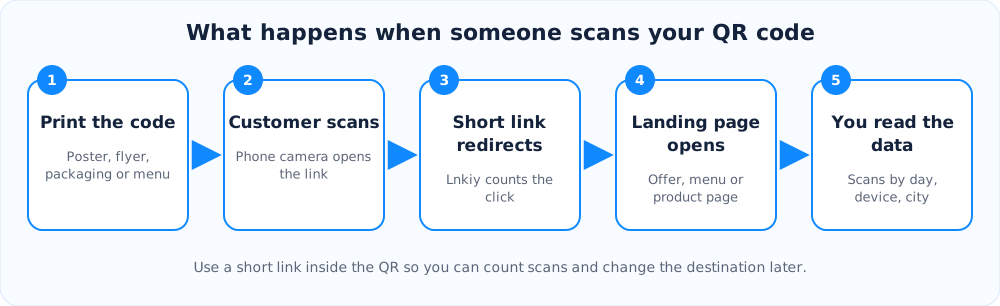
Pick the right spots
- Places where people wait: checkout counters, reception desks, bus stops, tables.
- Products and packaging: link to instructions, warranty registration or a reorder page.
- Flyers and posters: give a reason to scan, like a discount or a free guide.
- Business cards: link to your bio link page with all your contacts in one place.
Give people a reason and a good landing page
Nobody scans a plain square. Add a short instruction next to the code and tell people what they will get. After the scan, the page must load fast and work on a small screen, because almost every scanner is on a phone.
Static or dynamic?
A static code has the destination baked in. A dynamic code points to a short link you can edit later, so you can fix a typo or switch to a new offer without reprinting. Read static vs dynamic QR codes for the full comparison, then make your own with the free QR code generator.
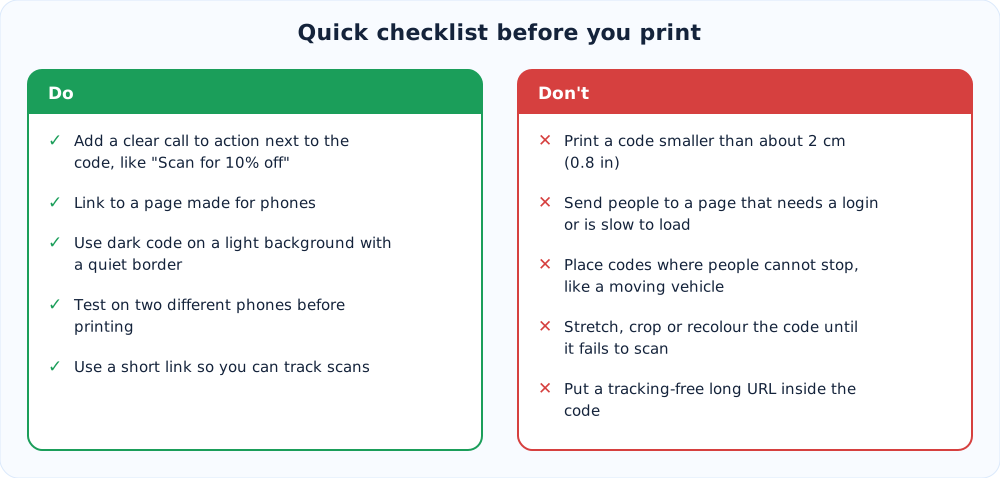
Measure and improve
Create a separate short link for each location or print run, such as one for the shop window and one for the flyer. Then compare scans per location in your analytics dashboard. Add UTM tags if you also want to see what scanners do on your site. Double down on the spots that work and drop the ones that do not.
Summary
Choose one goal, put a short link inside the code, place it where people have a moment to scan, send them to a fast mobile page, and track each placement separately. That is the whole recipe.
Ready to try it?
Make a short link in seconds. It is free and no sign-up is needed.
Create a short link