
Pictures make posts, ads and web pages more engaging, but the wrong size or a huge file can hurt you. A badly cropped image gets cut off by the platform, and a heavy image slows your page down, which frustrates visitors and can hurt your search performance. Here is how to get both right.
Use the right shape for each platform
Each placement shows images in a different shape. If you upload a landscape photo as a Story, the platform will crop or shrink it. Start with the right proportions and keep the important content near the centre, away from the edges.
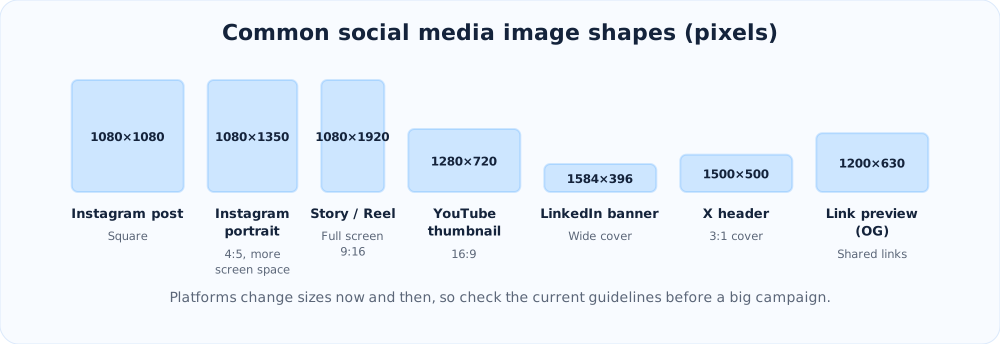
Pick the right file format
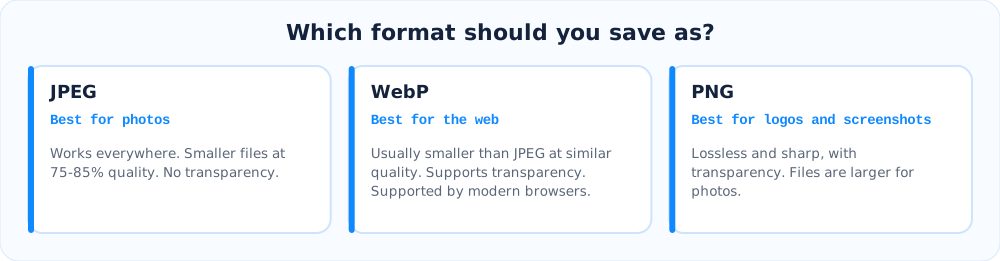
Why file size matters
Large photos taken on a modern phone can be several megabytes, far more than a web page needs. Loading them wastes your visitors' mobile data and makes pages feel slow. Compressing an image reduces its file size by removing detail that people rarely notice.
A simple workflow
- Choose the shape for the placement (square, portrait, wide cover and so on).
- Resize it to the display size. A 4000 pixel photo is wasted on a space that shows 1200 pixels.
- Export as WebP or JPEG at about 75 to 85% quality.
- Compare it with the original. If you cannot see a difference, you are done.
The free image compressor and resizer does all of this in your browser. You can drop in several photos, choose a social preset to crop them to the exact size, and download the results. Your files are never uploaded to a server.
More tips
- Write descriptive alt text for every image on your site. It helps accessibility and image search.
- Name files clearly, like
blue-kurta-front.webpinstead ofIMG_4021.jpg. - Set a proper preview image for shared links. Test it with the social share preview tool and create the tags with the meta tags generator.
- Keep text on images large and short, because most people view them on small screens.
Ready to try it?
Make a short link in seconds. It is free and no sign-up is needed.
Create a short link