
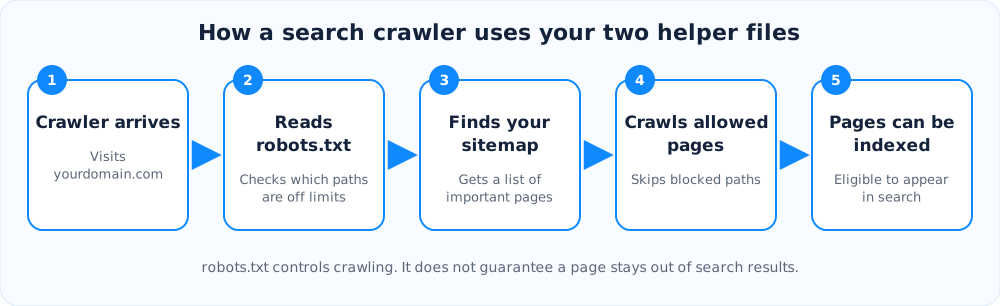
Two small files help search engines understand your website: robots.txt and a sitemap. They are easy to create, and a mistake in either can quietly hide your pages from Google. Here is what each one does in plain language.
robots.txt: the rules at the front door
This is a plain text file at yourdomain.com/robots.txt. It tells well-behaved crawlers which folders they should not visit. Typical uses are keeping bots out of admin pages, carts, internal search results and endless filter combinations, so they spend their time on pages that matter.
Sitemap: the map of important pages
A sitemap is an XML file that lists the pages you want search engines to find, often with the date each page last changed. It is especially useful for new sites, large sites, and pages that few other pages link to.
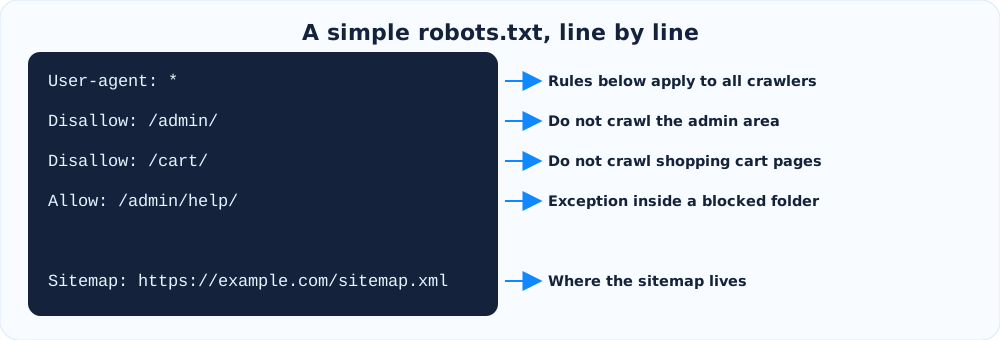
A simple example
You can read a robots.txt file one line at a time. Each rule starts with who it applies to, then what is blocked or allowed.
The free robots.txt generator builds this for you, with presets for WordPress and online stores, a field for your sitemap URL and an optional block list for AI training crawlers.
The mistakes to avoid
- Blocking the whole site by accident.
Disallow: /underUser-agent: *tells every crawler to stay away. This is common when a staging site goes live. - Using robots.txt to hide private pages. The file is public and only a request. Protect private content with a login.
- Thinking it removes pages from Google. A blocked page can still appear in results if other sites link to it. To keep a page out, use a noindex tag and let Google crawl it so it can see the tag. You can create tags with the meta tags generator.
- Blocking CSS or JavaScript files that Google needs to display your pages properly.
- Forgetting to update the sitemap after you add or remove important pages.
After you publish
Open yourdomain.com/robots.txt in your browser to confirm it loads, then submit your sitemap in Google Search Console. Check the coverage reports a few days later for pages that are blocked or not indexed. Clean page addresses also help, so see our guide to choosing good slugs and try the URL slug generator.
Ready to try it?
Make a short link in seconds. It is free and no sign-up is needed.
Create a short link