
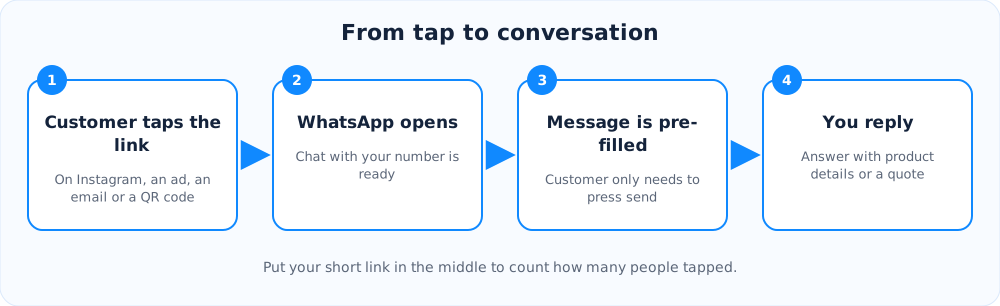
A click-to-chat link opens a WhatsApp conversation with your business in a single tap. There is no need to save your number first, and you can even fill in the first message for the customer. For many small businesses this is the fastest way to turn a social post or ad into a real conversation.
How the link is built
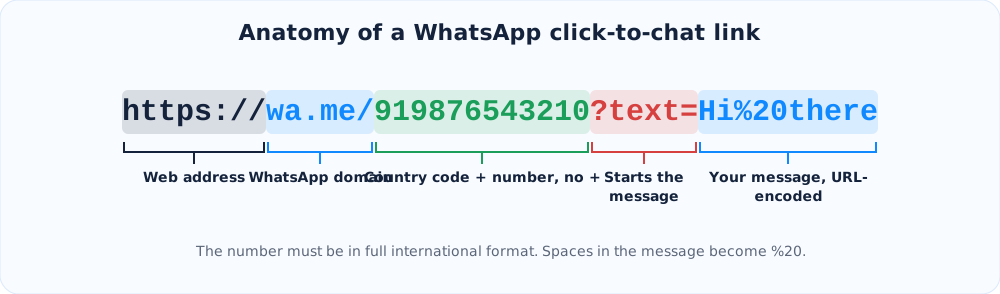
Every click-to-chat link starts with https://wa.me/, followed by your phone number in full international format. That means the country code plus the number, with no plus sign, no spaces, no dashes and no leading zeros. For an Indian mobile number, 98765 43210 becomes 919876543210.
Add a pre-filled message
To pre-fill the message, add ?text= and your message at the end. Special characters must be URL-encoded, so a space becomes %20 and an ampersand becomes %26. You do not have to do this by hand. Our free WhatsApp link generator encodes everything for you and also makes a button snippet and a QR code.
Write a message that helps you
- Mention the source: "Hi, I saw your Instagram offer on kurtas."
- Mention the product: "I want to order the blue kurta in size M."
- Keep it short and natural, because the customer can edit it before sending.
A message that names the campaign tells your team which ad or post worked, even before you look at any report.
Where to use the link
- Instagram and Facebook bios, and your bio link page
- Google Business Profile, website buttons and email signatures
- Ads that use a link as the destination
- Posters and menus, as a QR code
How to track the clicks
WhatsApp does not tell you where a chat came from. To measure results, put your wa.me link behind a custom short link such as lnkiy.in/diwali-chat. Make one short link for each channel, then compare clicks in the dashboard. You will see how many people tapped from Instagram versus email versus your flyer, and you can compare that with the number of chats you actually received.
Good practice
- Use a dedicated business number if you expect many chats.
- Reply quickly. Click-to-chat visitors expect an answer within minutes.
- Do not send unsolicited messages. Use these links so customers start the conversation themselves.
Ready to try it?
Make a short link in seconds. It is free and no sign-up is needed.
Create a short link